고정 헤더 영역
상세 컨텐츠
본문
반응형

Dioxus 예제 저장소는 10개의 개별 카테고리로 구성된 포괄적인 학습 리소스로, 각 카테고리는 프레임워크 기능의 구체적인 측면을 보여주도록 설계되었습니다. 이러한 예제는 교육 자료이자 실제 애플리케이션 구축을 위한 실질적인 시작점 역할을 합니다.
예시 조직
이러한 예제는 개발자가 기본 개념에서 고급 패턴까지 이해할 수 있도록 계층적으로 구성되어 있습니다.
| 범주 | 집중 | 주요 주제 |
| 01-app-demos | 신청서 작성 | 실제 앱, UI 패턴 |
| 02-building-ui | UI 구성 요소 | 대화형 요소, SVG |
| 03-assets-styling | 자산 및 CSS | 동적 자산, 메타 태그 |
| 04-managing-state | 국가 관리 | 신호, 컨텍스트, 리듀서 |
| 05-using-async | 비동기 작업 | 선물, 스트림, 서스펜스 |
| 06-routing | 항해 | 라우터, 쿼리 매개변수 |
| 07-fullstack | 서버 통합 | 서버 기능, SSR |
| 08-apis | 플랫폼 API | 파일 처리, 윈도우 |
| 09-reference | 언어 특징 | RSX 패턴, 제네릭 |
| 10-integrations | 외부 도구 | 테일윈드, 베비, PWA |
실행 예제
기본 예제
간단한 예제는 Cargo를 사용하여 직접 실행할 수 있습니다.
cargo run --example hello_world

# Run with specific platform features
cargo run --example calculator --features desktop
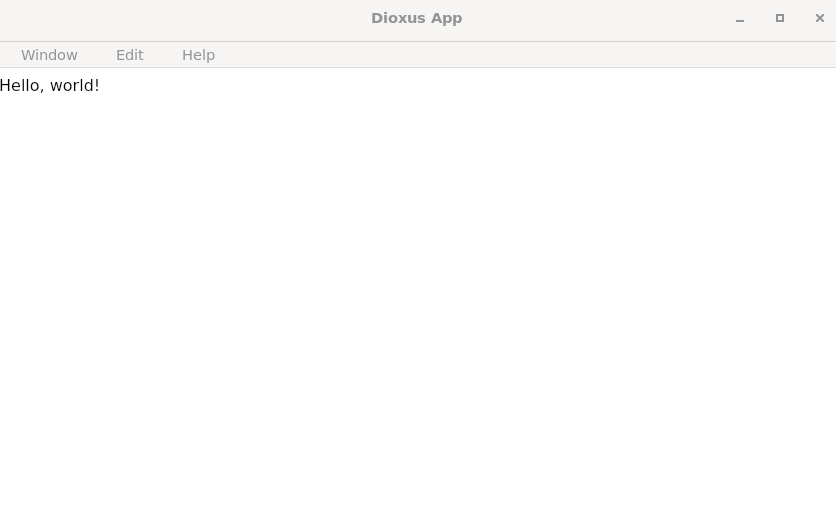
예를 들어, hello_world.rs 는 기본 구조를 보여줍니다.
use dioxus::prelude::*;

fn main() {
    dioxus::launch(app);
}

fn app() -> Element {
    rsx! {
        div { "Hello, world!" }
    }
}
복잡한 예
더욱 정교한 예에는 고유한 Cargo.toml구성이 포함되며 특정 기능이 필요할 수 있습니다.
# Navigate to example directory
cd examples/01-app-demos/calculator

# Run with platform-specific features
cargo run --features desktop
계산기 예제는 키보드 이벤트 처리와 사용자 정의 스타일을 사용한 고급 상태 관리를 보여줍니다.
use dioxus::events::*;
use dioxus::html::input_data::keyboard_types::Key;
use dioxus::prelude::*;

const STYLE: Asset = asset!("assets/calculator.css");

fn main() {
    dioxus::LaunchBuilder::desktop()
        .with_cfg(desktop!({
            use dioxus::desktop::{Config, LogicalSize, WindowBuilder};
            Config::new().with_window(
                WindowBuilder::default()
                    .with_title("Calculator")
                    .with_inner_size(LogicalSize::new(300.0, 525.0)),
            )
        }))
        .launch(app);
}

fn app() -> Element {
    let mut val = use_signal(|| String::from("0"));

    let mut input_digit = move |num: String| {
        if val() == "0" {
            val.set(String::new());
        }
        val.push_str(num.as_str());
    };

    let mut input_operator = move |key: &str| val.push_str(key);

    let handle_key_down_event = move |evt: KeyboardEvent| match evt.key() {
        Key::Backspace => {
            if !val().is_empty() {
                val.pop();
            }
        }
        Key::Character(character) => match character.as_str() {
            "+" | "-" | "/" | "*" => input_operator(&character),
            "0" | "1" | "2" | "3" | "4" | "5" | "6" | "7" | "8" | "9" => input_digit(character),
            _ => {}
        },
        _ => {}
    };

    rsx! {
        Stylesheet { href: STYLE }
        div { id: "wrapper",
            div { class: "app",
                div { class: "calculator", tabindex: "0", onkeydown: handle_key_down_event,
                    div { class: "calculator-display",
                        if val().is_empty() {
                            "0"
                        } else {
                            "{val}"
                        }
                    }
                    div { class: "calculator-keypad",
                        div { class: "input-keys",
                            div { class: "function-keys",
                                button {
                                    class: "calculator-key key-clear",
                                    onclick: move |_| {
                                        val.set(String::new());
                                        if !val.cloned().is_empty() {
                                            val.set("0".into());
                                        }
                                    },
                                    if val.cloned().is_empty() { "C" } else { "AC" }
                                }
                                button {
                                    class: "calculator-key key-sign",
                                    onclick: move |_| {
                                        let new_val = calc_val(val.cloned().as_str());
                                        if new_val > 0.0 {
                                            val.set(format!("-{new_val}"));
                                        } else {
                                            val.set(format!("{}", new_val.abs()));
                                        }
                                    },
                                    "±"
                                }
                                button {
                                    class: "calculator-key key-percent",
                                    onclick: move |_| val.set(format!("{}", calc_val(val.cloned().as_str()) / 100.0)),
                                    "%"
                                }
                            }
                            div { class: "digit-keys",
                                button {
                                    class: "calculator-key key-0",
                                    onclick: move |_| input_digit(0.to_string()),
                                    "0"
                                }
                                button {
                                    class: "calculator-key key-dot",
                                    onclick: move |_| val.push('.'),
                                    "●"
                                }
                                for k in 1..10 {
                                    button {
                                        class: "calculator-key {k}",
                                        name: "key-{k}",
                                        onclick: move |_| input_digit(k.to_string()),
                                        "{k}"
                                    }
                                }
                            }
                        }
                        div { class: "operator-keys",
                            for (key, class) in [("/", "key-divide"), ("*", "key-multiply"), ("-", "key-subtract"), ("+", "key-add")] {
                                button {
                                    class: "calculator-key {class}",
                                    onclick: move |_| input_operator(key),
                                    "{key}"
                                }
                            }
                            button {
                                class: "calculator-key key-equals",
                                onclick: move |_| val.set(format!("{}", calc_val(val.cloned().as_str()))),
                                "="
                            }
                        }
                    }
                }
            }
        }
    }
}

fn calc_val(val: &str) -> f64 {
    let mut temp = String::new();
    let mut operation = "+".to_string();

    let mut start_index = 0;
    let mut temp_value;
    let mut fin_index = 0;

    if &val[0..1] == "-" {
        temp_value = String::from("-");
        fin_index = 1;
        start_index += 1;
    } else {
        temp_value = String::from("");
    }

    for c in val[fin_index..].chars() {
        if c == '+' || c == '-' || c == '*' || c == '/' {
            break;
        }
        temp_value.push(c);
        start_index += 1;
    }

    let mut result = temp_value.parse::<f64>().unwrap();

    if start_index + 1 >= val.len() {
        return result;
    }

    for c in val[start_index..].chars() {
        if c == '+' || c == '-' || c == '*' || c == '/' {
            if !temp.is_empty() {
                match &operation as &str {
                    "+" => result += temp.parse::<f64>().unwrap(),
                    "-" => result -= temp.parse::<f64>().unwrap(),
                    "*" => result *= temp.parse::<f64>().unwrap(),
                    "/" => result /= temp.parse::<f64>().unwrap(),
                    _ => unreachable!(),
                };
            }
            operation = c.to_string();
            temp = String::new();
        } else {
            temp.push(c);
        }
    }

    if !temp.is_empty() {
        match &operation as &str {
            "+" => result += temp.parse::<f64>().unwrap(),
            "-" => result -= temp.parse::<f64>().unwrap(),
            "*" => result *= temp.parse::<f64>().unwrap(),
            "/" => result /= temp.parse::<f64>().unwrap(),
            _ => unreachable!(),
        };
    }

    result
}
플랫폼별 구성
데스크톱 애플리케이션
데스크톱 예제는 LaunchBuilder플랫폼별 구성에 사용됩니다.
dioxus::LaunchBuilder::desktop()
    .with_cfg(desktop!({
        use dioxus::desktop::{Config, LogicalSize, WindowBuilder};
        Config::new().with_window(
            WindowBuilder::default()
                .with_title("Calculator")
                .with_inner_size(LogicalSize::new(300.0, 525.0)),
        )
    }))
    .launch(app);
웹 애플리케이션
web해당 기능이 활성화되면 웹 예제는 브라우저 배포를 위해 자동으로 구성됩니다 .
[features]
default = ["web"]
web = ["dioxus/web"]
통합 예제
Tailwind CSS 와 같은 외부 통합의 예로는 자산 관리가 있습니다.
rsx! {
    Stylesheet { href: asset!("/assets/tailwind.css") }
    div {
        class: "container mx-auto flex flex-wrap p-5",
        // Tailwind classes...
    }
}
개발 워크플로
핫 리로딩
많은 예제에서 개발 중 핫 리로딩을 지원합니다. 다음을 통해 활성화할 수 있습니다.
dx serve --example your_example_name자산 관리
asset!정적 자산에 대한 매크로를 사용하는 예 :
const STYLE: Asset = asset!("/examples/assets/calculator.css");
assets 디렉토리 에는 여러 예제에서 사용되는 공유 CSS 파일이 들어 있습니다.
구성 파일
복잡한 예로는 Dioxus.toml애플리케이션 메타데이터가 있습니다.
[application]
name = "hot_dog"

[bundle]
identifier = "com.dioxuslabs"
publisher = "Dioxus Labs"
학습 경로
초보자의 경우 다음 예시를 따라 진행해 보세요.
examples/01.app-demo/counters.rs
//! A simple counters example that stores a list of items in a vec and then iterates over them.

use dioxus::prelude::*;

const STYLE: Asset = asset!("/examples/assets/counter.css");

fn main() {
    dioxus::launch(app);
}

fn app() -> Element {
    // Store the counters in a signal
    let mut counters = use_signal(|| vec![0, 0, 0]);

    // Whenever the counters change, sum them up
    let sum = use_memo(move || counters.read().iter().copied().sum::<i32>());

    rsx! {
        Stylesheet { href: STYLE }

        div { id: "controls",
            button { onclick: move |_| counters.push(0), "Add counter" }
            button { onclick: move |_| { counters.pop(); }, "Remove counter" }
        }

        h3 { "Total: {sum}" }

        // Calling `iter` on a Signal<Vec<>> gives you a GenerationalRef to each entry in the vec
        // We enumerate to get the idx of each counter, which we use later to modify the vec
        for (i, counter) in counters.iter().enumerate() {
            // We need a key to uniquely identify each counter. You really shouldn't be using the index, so we're using
            // the counter value itself.
            //
            // If we used the index, and a counter is removed, dioxus would need to re-write the contents of all following
            // counters instead of simply removing the one that was removed
            //
            // You should use a stable identifier for the key, like a unique id or the value of the counter itself
            li { key: "{i}",
                button { onclick: move |_| counters.write()[i] -= 1, "-1" }
                input {
                    r#type: "number",
                    value: "{counter}",
                    oninput: move |e| {
                        if let Ok(value) = e.parsed() {
                            counters.write()[i] = value;
                        }
                    }
                }
                button { onclick: move |_| counters.write()[i] += 1, "+1" }
                button { onclick: move |_| { counters.remove(i); }, "x" }
            }
        }
    }
}
예제 실행 및 결과
cargo run --example hello_world --features desktop
cargo run --example calculator --features desktop

cargo run --example counters --features desktop
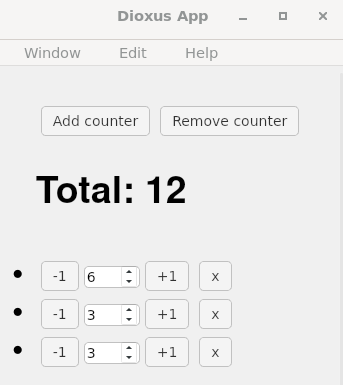
예제 소스를 파악하시고 실행을 해보시길 바랍니다. 다음에도 예제에 대한 소스 코드와 실행을 해보는 시간을 가져볼게요.
반응형


